Claude Code does its best work when you let it run, and it needs you at the worst moment: a command to approve, a question to answer, a limit to wait out. If you are away from the desk, the session simply waits. Hypernova is a remote control for Claude Code: the phone becomes your window onto the sessions on your Mac or Linux server, and you answer them where you are.
It is not a second copy of Claude Code and not a cloud service. Claude Code stays on your computer (a Mac, or a Linux server or VPS), signed in with your own plan. Hypernova adds a small service next to it and an Android app that pairs with it.
What you see on the phone#
Home shows every session on that computer as a sky. The sun is an accretion disk, and the disk is your 5-hour window: it drains as you spend it. Projects orbit it as planets. Under the sky, each session is a card with its project, its title, what it is doing right now and a status chip, so a session that needs you stands out at once.
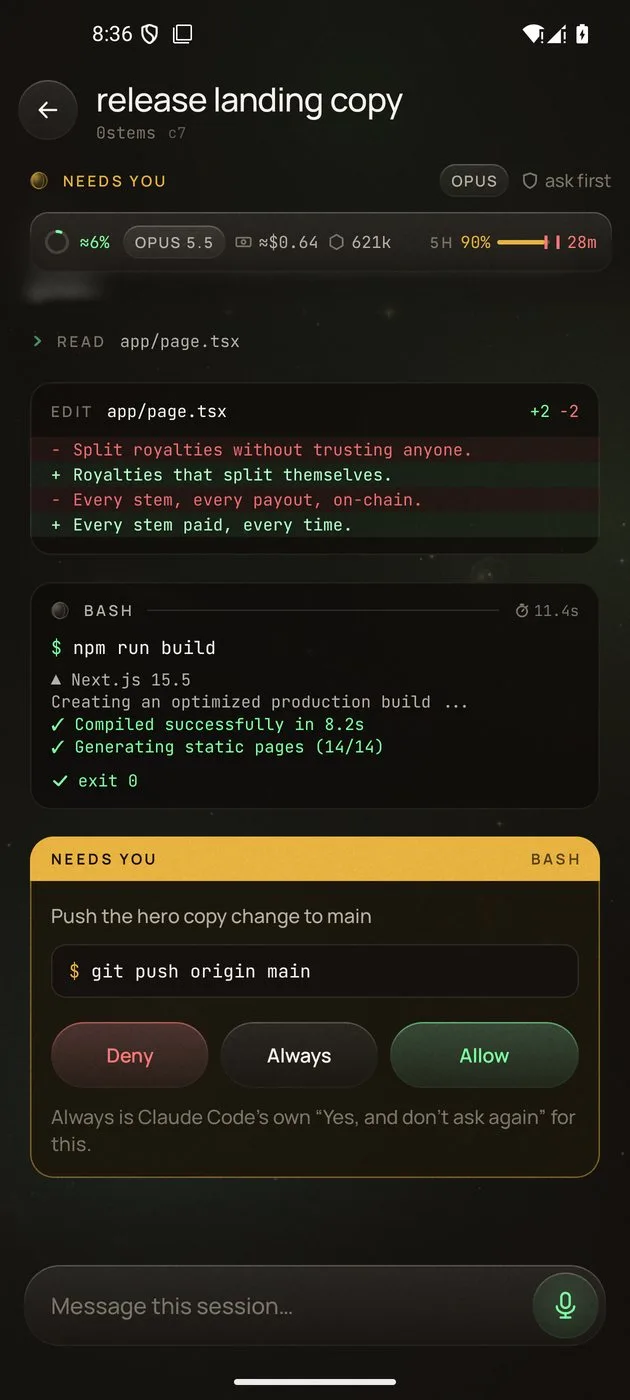
Open a session and you get a native chat built from Claude Code's own transcript: your messages, the replies, edits as diffs, and each shell command as a small live terminal with its output. When you want the real thing, the session's terminal is there too, the same live terminal you would see at the computer.
Sessions you started in a terminal, too#
You don't have to start work from the phone. During setup Hypernova adds a claude function to
your shell (~/.zshrc on a Mac; ~/.bashrc or ~/.zshrc on Linux). Every interactive claude
you type then runs in a shared terminal: it looks and works the same in the terminal, and your
phone can watch it live and type into it. From any
other terminal, hn ls lists the shared terminals and hn attach <id> joins one.
Anything else (claude -p, pipes, subcommands) goes straight to the real command. Sessions started
some other way still show up on the phone with their live transcript and approvals, through Claude
Code's hooks; you just can't type into them.
Answer, start and follow along#
- Approve from anywhere. Allow, deny or answer a question from the phone, or right on the notification after you unlock. See approving Claude Code permissions from Android.
- Start a session. Type or say the prompt, then pick a project (found by a few letters), a model and a permission mode.
- Reply and steer. Send the next message, interrupt a turn, switch the model or the mode in the chat.
- Monitor your coding agent. The session's status line says what it is doing, with a timer, and a small planet spins while it works. Notifications tell you when a turn finishes or waits.
- Files and Telescope. Browse a session's folder and download a file, or look at what it built: a local web page, an emulator or, on a Mac, a window.
How the phone reaches your computer#
There is no Hypernova server in between. On your Wi‑Fi the phone talks to your Mac or home server directly, over mutual TLS, pinned to it by the pairing code. Away from home, and always for a VPS, it goes over your own Tailscale network, built into Hypernova on both ends. The details are in remote access with Tailscale and the security model.
How to set it up#
- On a Mac with Apple silicon and macOS 14 or later, download and open Hypernova for Mac.
- Follow Setup in the menu bar: it finds Claude Code, starts the background service and
connects Claude Code's hooks and the
claudefunction. - Optionally sign in to Tailscale in the Tailscale step, to reach the Mac away from home.
- In the last step, Get the app on your Android phone (Android 10 or later) by scanning the code, and install it.
- Click I have the app, then scan the pairing code with the phone's camera.
- Allow notifications, so approvals reach you. Open a new Terminal tab and run
claudeas usual.
On a Linux server or VPS instead, install the Linux package and pair with hypernova pair: see
Hypernova on Linux. The full Mac walkthrough is on the
install page.
FAQ#
Is there a Claude Code app for Android?#
Hypernova is an Android app for the Claude Code sessions on your own Mac or Linux server. It is an independent, open source project, not an app from Anthropic, and it needs Claude Code installed and signed in on that computer.
Is there an iPhone version?#
Not at the moment. The phone app is for Android 10 and later; the host is a Mac (macOS 14 or later, Apple silicon) or a Linux machine (Ubuntu or Debian).
Does my code leave my computer?#
Sessions run on your Mac or Linux server. Their text goes only to the phones you paired, directly on your Wi‑Fi or over your own tailnet. Provider keys never leave that computer.
Do I have to start sessions from the phone?#
No. Sessions you start with claude in a terminal show up on the phone, and with the shell
integration you can type into them from the phone as well.
What does it cost?#
Hypernova is free and open source under the Apache License 2.0. Claude Code runs on your own plan or API key, as it does without Hypernova. More answers are in the FAQ.
Updated for Hypernova 0.2.0.
Free and open source, for Mac, Linux and Android.
Install Hypernova