Coding agents work best when you let them run, and they need you at odd moments: a command to approve, a question to answer. Hypernova Lens is the part of Hypernova that runs on Even Realities G2 glasses. The glasses become the screen, your voice the keyboard and your earbuds a second screen. Lens uses the glasses' own text, in the same words as the phone app.
What you see on the lens#
The glance. Look up and you get one line per session that matters: working, needing you, or finished in the last 45 minutes, four at most. Each line has the project, then what it does ("Bash: ./gradlew build", "wants to run git push origin main"), then its age. The one that needs you is on top. Your 5-hour usage sits in the corner ("42% resets in 2h 11m"), and a small accretion disk above the lines draws the same budget as the phone's sky.
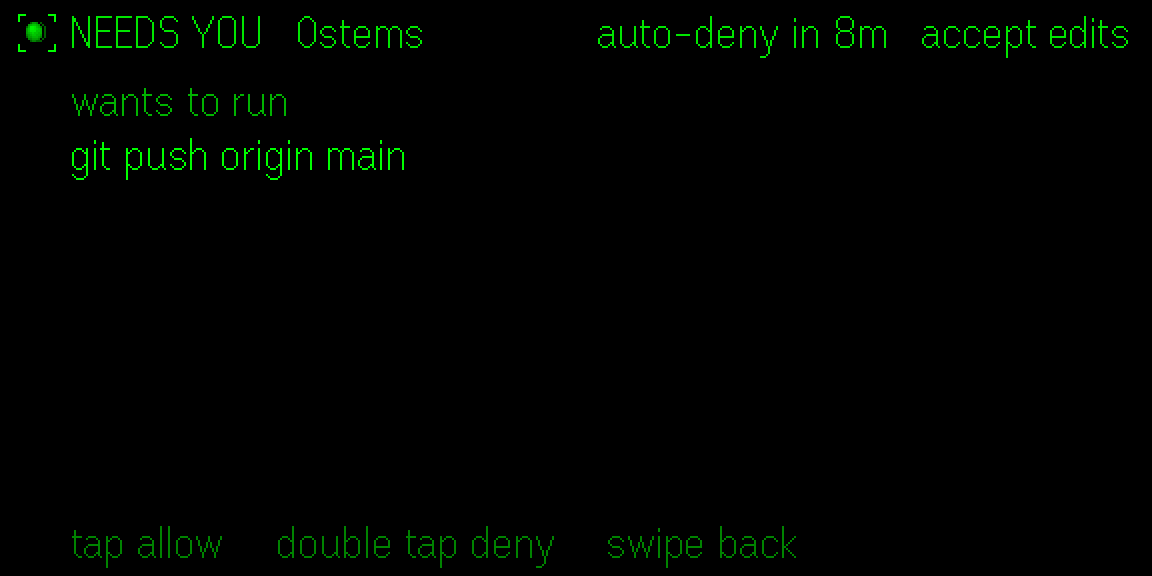
Needs you. An approval shows the command, the reason and how soon it is denied by itself ("auto-deny in 9m"). Tap allows, double tap denies, a swipe sets it aside. Questions and plans work the same way: swipe through the options, tap to pick.
Results. When a session finishes you hear a soft blip and get a card with the reply and what the session did: files changed, tests passed or failed, how long it took. Tap to have the reply read into your earbuds.
Telescope. Say "telescope" and the lens shows what the session is building: its web page, the Android emulator, its terminal or the last picture it made.
Talk to it#
Hold the temple and speak. Captions appear as you go, and what you said is sent after a short count unless you cancel it with a double tap. On the glance a hold starts a new session, or talks to the one that needs you. "Deny, use a feature branch" denies and tells Claude why.
Risky commands such as a force push, rm -rf or a deploy need their own verb by voice ("approve
push", "approve delete"). "Always" by voice allows once only: the standing rule stays on your
phone, where a fingerprint can confirm it.
Speech goes through your Mac or Linux server with your own Soniox key. Voice is optional: the gestures are enough, and a one-minute guide on the glasses teaches them.
On a bike or a walk#
Say "moving" and the lens keeps to two short lines at the top, out of the way of the road. Results are said in one sentence, and a question is read out with numbered options, so "one" or "two" answers it. "Debrief" catches you up, and "still" brings the whole lens back.
How it connects#
Lens talks only to the Hypernova app on the same phone. The app carries everything to your Mac or Linux server over its own connection: your Wi-Fi, or your Tailscale network away from home. Lens holds no address of that computer and no daemon token. The first time, Lens and the phone show the same six-digit code; you allow Lens in the app if they match, then tap the glasses to confirm.
How to set it up#
Lens is not in a store yet. Today you take the package from the release (or build it from the source) and load it through Even Hub.
- Install Hypernova on your Mac or Linux server and the Android app on your phone, and pair them (install guide).
- Make sure the Even App is 2.2.10 or later and your G2 glasses are connected to it.
- Download
Hypernova-Lens.ehpkfrom the latest release (or build it from the repository:cd lens,npm ci,npm run pack, which writesout.ehpk). - Upload the
.ehpkto the Even Hub developer portal and open it from the Even App. - Allow Lens in the Hypernova app when the six-digit codes match, then tap the glasses.
- For voice, add your Soniox key in the app's Settings → Voice.
The full details are in lens/README.md.
FAQ#
Does Lens work without the Hypernova phone app?#
The public build does not: it reaches only the Hypernova app on the same phone, which keeps the connection to your computer. A private build can pair with a Mac directly; the Lens README explains how.
Has it been tested on real G2 glasses?#
Lens is used on G2 glasses, but most of its behaviour was checked in the Even Hub simulator. Some details, such as how fast image writes are and how the firmware reports a few gestures, have not been checked one by one on the hardware. The Lens README lists them under "Not verified yet".
Do I need voice to use it?#
No. Tap, double tap, swipe and hold cover everything. Voice needs a Soniox key on your computer, and audio goes to Soniox only while you hold the temple.
Does it work with Codex too?#
Yes. Codex sessions show on the lens too, with "· Codex" after the project's name. On a Mac with Codex only, the corner and the disk follow Codex's usage. See Claude Code and Codex together.
What does it cost?#
Hypernova and Lens are open source under the Apache License 2.0. You need the glasses, your own agent plan, and optionally a Soniox key for voice.
Updated for Hypernova 0.2.0.
Free and open source, for Mac, Linux and Android.
Install Hypernova